
Cegat Tabrak
Collect files. Guard the gate. Finish the shift.
View contribution & implementation evidence ↓Collect files. Guard the gate. Finish the shift.
Designed and built by Alexanders Schwartzmann · end-to-end
- Game design & career loop
- Unity gameplay & HUD
- Inspection & transfer mechanics
- Career saves & equipment
Play as the neighborhood guard: collect a visitor’s files, solve the inspection, transfer them, then manage your shift income and equipment.
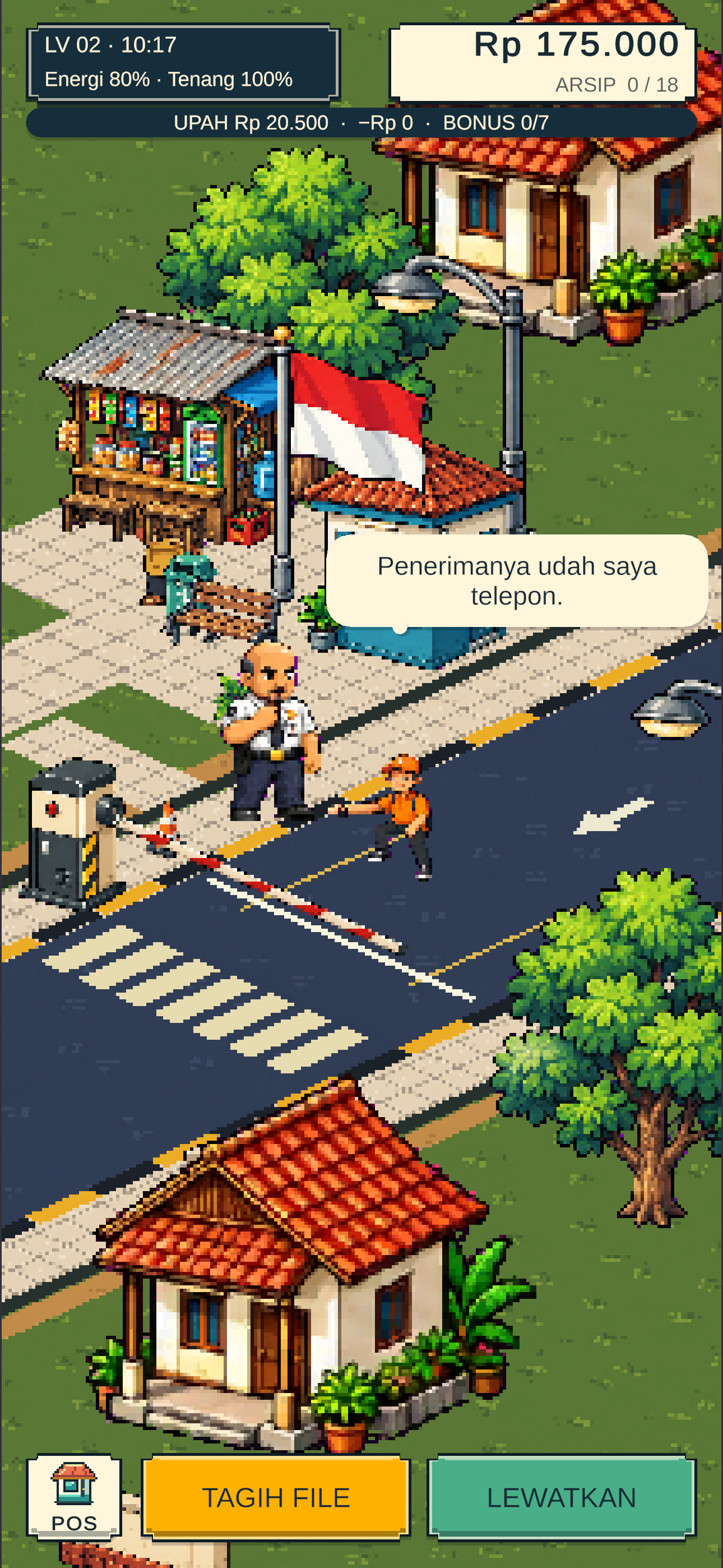
Meet a visitor at the gate
The current 1.0.3 HUD opens with a visitor at the guard post. Tagih File starts the inspection; Lewatkan continues the encounter. Energy, calm, wages, and archive capacity stay visible.
1.0.3 source · fresh native Unity renders with in-memory scenarios
- 1.0.3 career shift & guest encounters
- Inspect and transfer guest files
- Shift pay, archives & equipment upgrades
Unity / C# / URP / ShaderLab
- The problem
- A guard’s daily routine needs decisions, tension, and a reason to return next shift.
- What I built
- A Unity career loop: meet visitors, inspect files, transfer them, and manage equipment.
- What it enables
- Inspection decisions connect to shift wages, archive capacity, and the next upgrade.
Let’s build around your workflow.
I designed and built this project end to end.
Alexanders Schwartzmann
From product design, UX, and architecture to the feature implementation below.
- Game design & career loop
- Unity gameplay & HUD
- Inspection & transfer mechanics
- Career saves & equipment
How the main flow works
- 01
Visitor arrives at the guard post
- 02
Inspect the requested files
- 03
Transfer to the archive
- 04
Shift pay & equipment upgrades
Implementation evidence
The implemented feature, how it works, and the technical decision behind it.
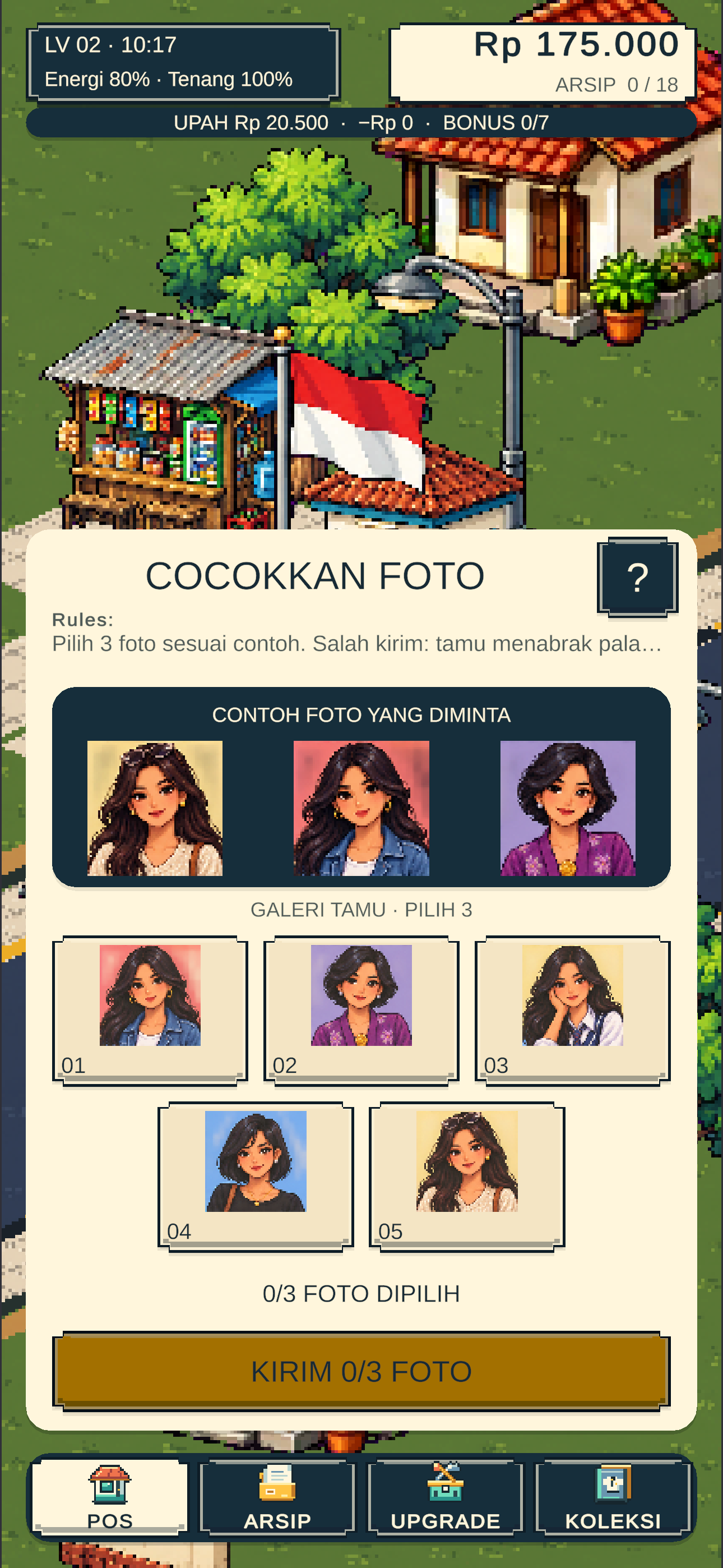
An inspection inside the career loop
The 1.0.3 game connects a visitor encounter to photo matching, then file transfer and archive capacity.
Inspection is part of the guard’s ongoing career, with the HUD carrying energy, wages, and archive state.
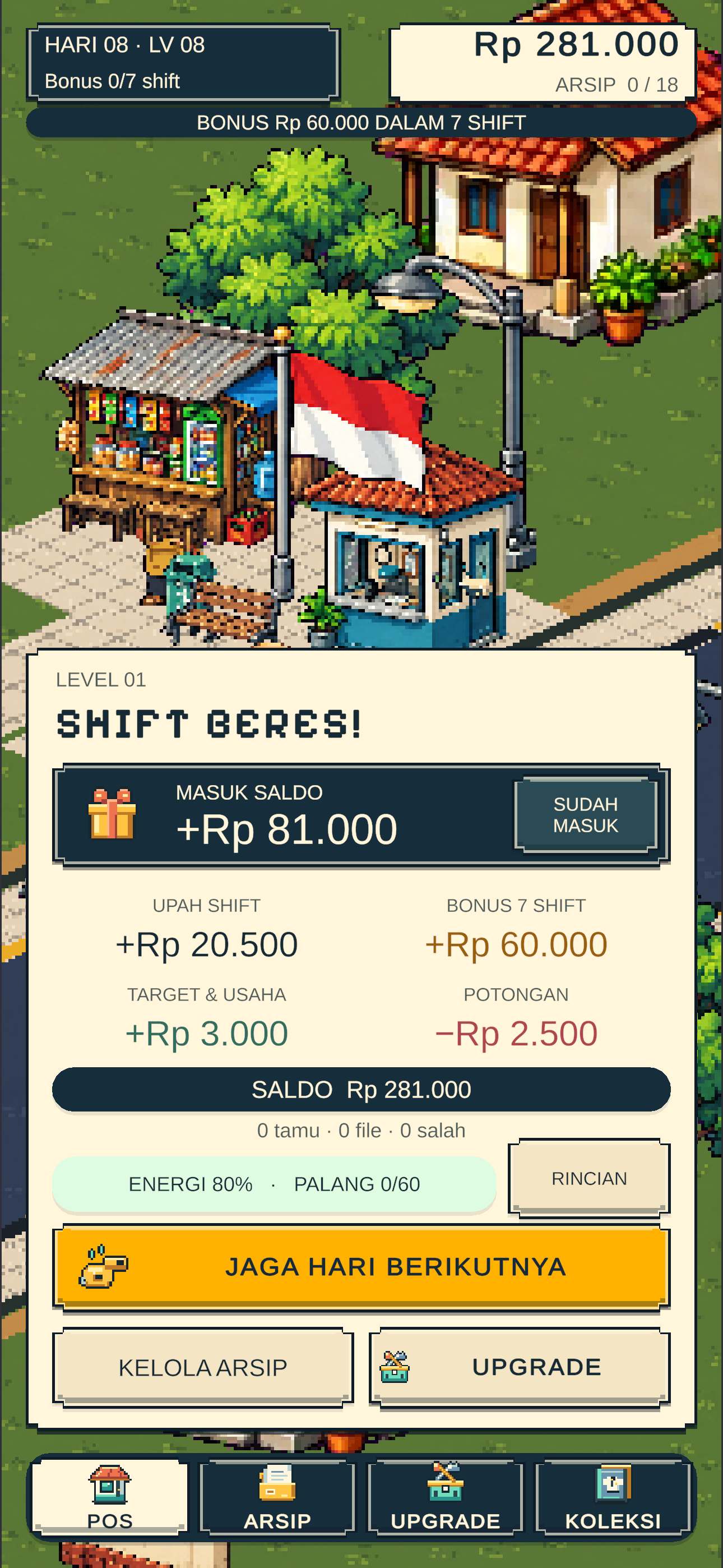
Progression that survives scene changes
The shared CareerSession holds the career state used by shift results, archives, and equipment screens.
Career state is shared across scenes, rather than each screen keeping a separate progression record.
Native Unity renders from 1.0.3 with in-memory scenarios. This verifies screen rendering, not an IPA recording, physical-device performance, or a new App Store release.
1.0.3 source · fresh native Unity renders with in-memory scenarios ·
Core purpose
Play as the neighborhood guard: collect a visitor’s files, solve the inspection, transfer them, then manage your shift income and equipment.
Feature highlights
- 1.0.3 career shift & guest encounters
- Inspect and transfer guest files
- Shift pay, archives & equipment upgrades
The walkthrough
Meet a visitor at the gate
The current 1.0.3 HUD opens with a visitor at the guard post. Tagih File starts the inspection; Lewatkan continues the encounter. Energy, calm, wages, and archive capacity stay visible.
Inspect the requested files
This visit uses photo matching: compare three references with five candidates, then submit the matching three. Wrong live submissions can lead to a crash and gate repairs.
Transfer files at the guard post
After a valid selection, transfer progress appears above the guard in the game world. The transfer stage connects the inspection with the archive and the next visitor.
Collect the shift pay
The current results screen explains wages, the seven-shift bonus, other rewards, and deductions, with routes to the next day, archive, and upgrades. The capture uses a sample payroll scenario.
Upgrade the guard’s equipment
The original upgrade screen compares the installed equipment with the next rank and its cost. This preview does not buy anything.
Source and preview scope
1.0.3 source · fresh native Unity renders with in-memory scenarios. Captured on 13 October 2026. Screen navigation stays within this portfolio.
ProjectSettings identifies version 1.0.3. The October 9 release receipt records iOS candidate 1.0.3 (18). This footage renders the local source; it is not an IPA recording or evidence of the current App Store status.
Fungsi utama
Berperan sebagai satpam kampung: tagih file tamu, selesaikan pemeriksaan, transfer ke arsip, lalu kelola upah shift dan peralatan.
Fitur pilihan
- Shift karier & tamu versi 1.0.3
- Periksa dan transfer file tamu
- Upah shift, arsip & upgrade peralatan
Alur yang ditampilkan
Tamu datang: tagih atau lewatkan
HUD 1.0.3 menampilkan tamu di pos. Tagih File memulai pemeriksaan; Lewatkan melanjutkan kunjungan. Energi, ketenangan, upah, dan kapasitas arsip tetap terlihat.
Periksa file yang diminta
Kunjungan ini memakai cocokkan foto: bandingkan tiga acuan dengan lima kandidat, lalu kirim tiga yang benar. Salah kirim dalam permainan dapat berujung tabrakan dan perbaikan palang.
Transfer file di pos
Sesudah pilihan benar, progres transfer muncul di atas satpam dalam dunia game. Tahap transfer menghubungkan pemeriksaan dengan arsip dan kunjungan berikutnya.
Terima hasil shift
Layar hasil merinci upah, bonus tujuh shift, tambahan, dan potongan. Pemain bisa lanjut hari berikutnya, kelola arsip, atau upgrade. Capture memakai skenario upah contoh.
Upgrade peralatan satpam
Layar upgrade asli membandingkan peralatan terpasang dengan rank berikutnya beserta biayanya. Preview ini tidak membeli apa pun.
Source dan batas preview
Source 1.0.3 · render Unity native baru dengan skenario in-memory. Capture diambil pada 13 Oktober 2026. Navigasi layar berlangsung di portfolio.
ProjectSettings menetapkan versi 1.0.3. Laporan rilis 9 Oktober mencatat kandidat iOS 1.0.3 (18). Footage ini adalah render source lokal, bukan rekaman dari IPA atau bukti status App Store sekarang.