
ABAJ ERP
From incoming orders to stock and profit.
View contribution & implementation evidence ↓From incoming orders to stock and profit.

Designed and built by Alexanders Schwartzmann · end-to-end
- Back-office UX & modules
- Multi-channel order backend
- Ingredient stock & recipes
- COGS & accounting journal
Follow the back office: inspect incoming orders, check ingredients and stock movements, then read profit and the journal.
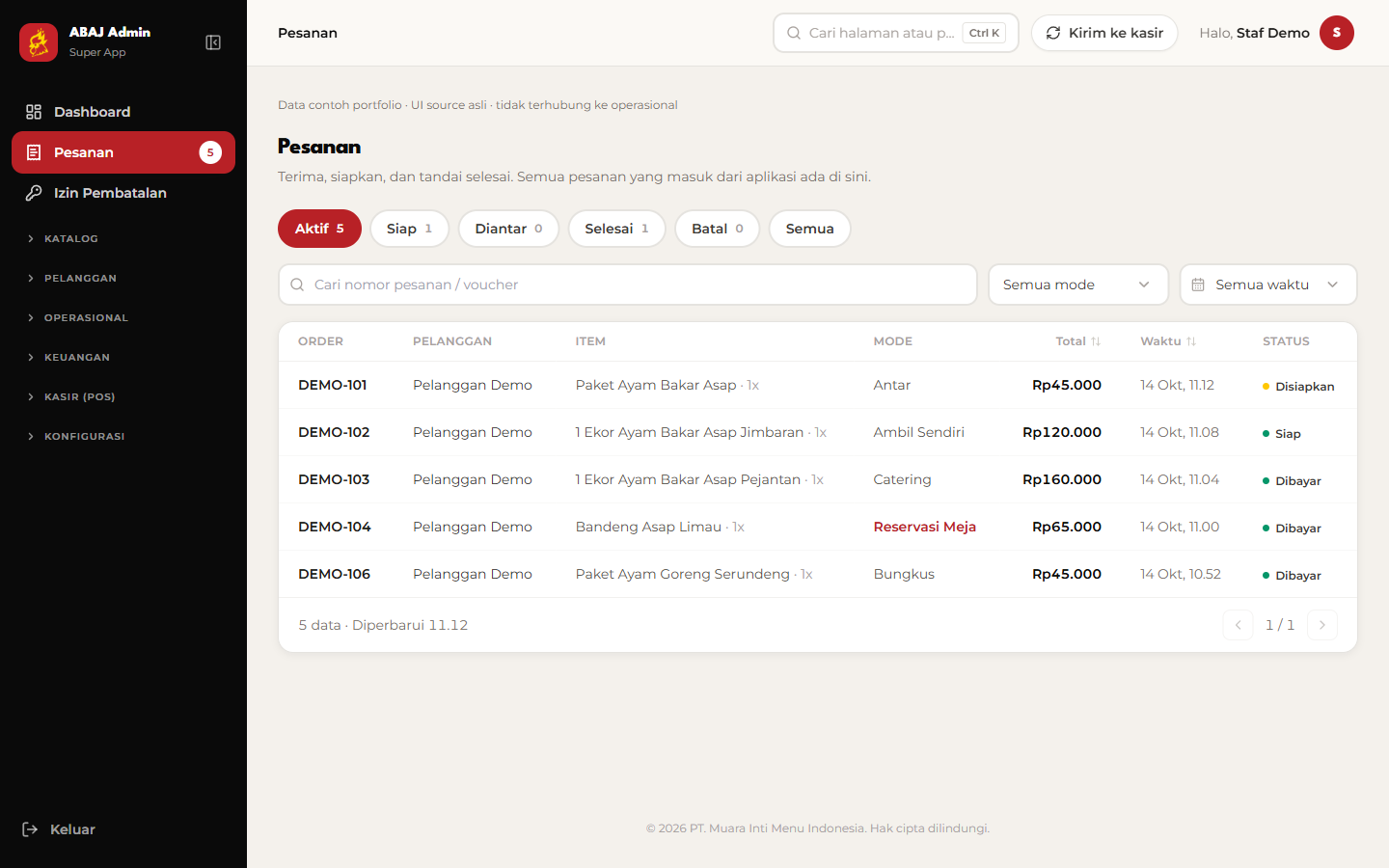
Inspect orders across channels
The order queue brings delivery, pickup, dine-in, takeaway, reservations, and catering together with status and date filters. Operational records are samples.
Original ERP shell & modules · isolated sample operations
- Orders across six sales channels
- Ingredients, stock & inventory ledger
- Revenue, COGS & debit/credit journal
Next.js / TypeScript / Drizzle / Turso / Tailwind CSS
- The problem
- Orders, ingredient stock, and financial records need a shared operational view.
- What I built
- A back office for six sales channels, inventory movements, COGS, profit, and accounting journals.
- What it enables
- The team can trace incoming orders, check ingredients, and read the financial picture together.
Let’s build around your workflow.
I designed and built this project end to end.
Alexanders Schwartzmann
From product design, UX, and architecture to the feature implementation below.
- Back-office UX & modules
- Multi-channel order backend
- Ingredient stock & recipes
- COGS & accounting journal
How the main flow works
- 01
Orders across sales channels
- 02
Recipe quantities & ingredient costs
- 03
Paid-order journal posting
- 04
Revenue, COGS & profit reports
Implementation evidence
The implemented feature, how it works, and the technical decision behind it.
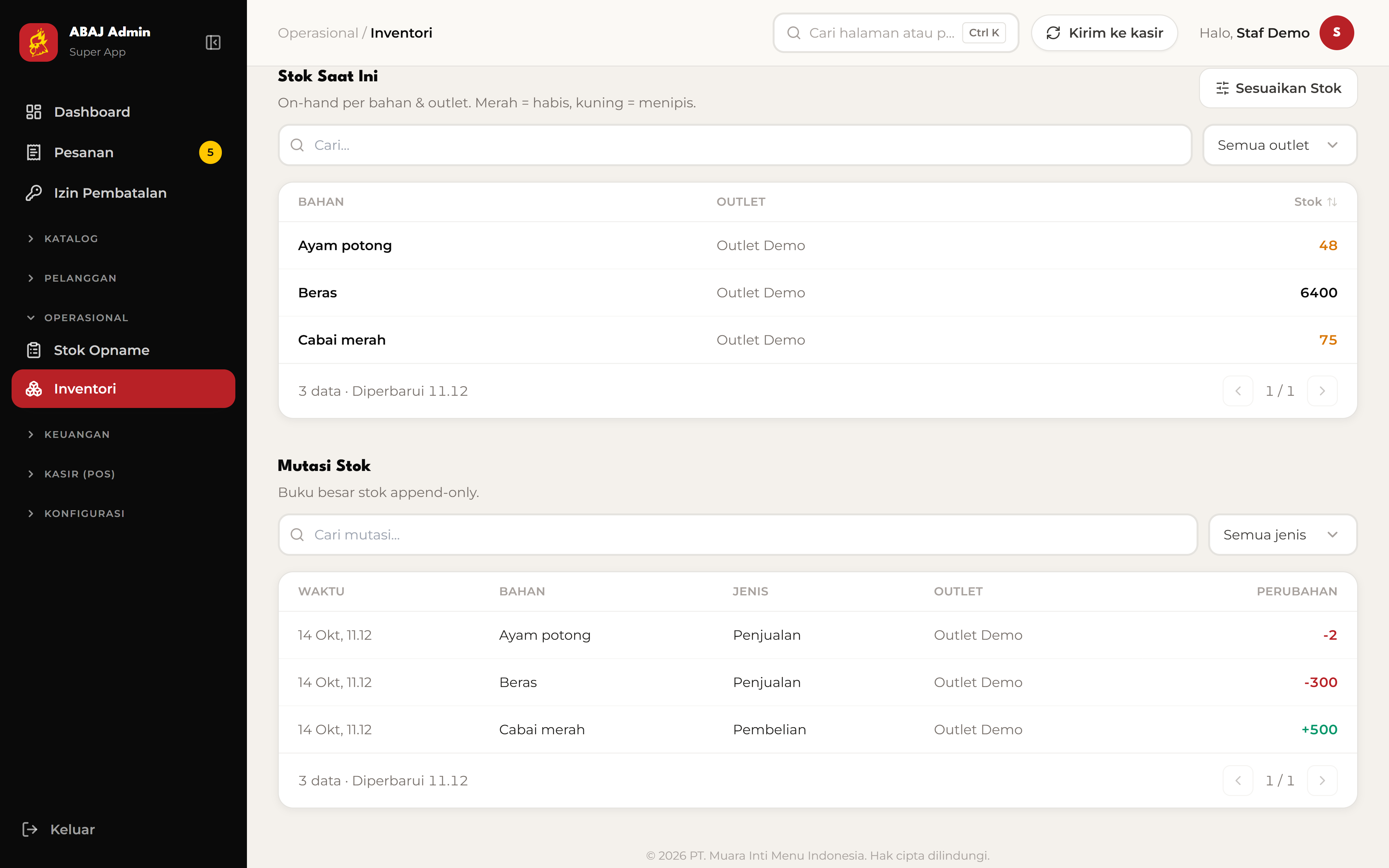
Inventory with an operational ledger
The inventory module tracks units, ingredient costs, stock quantity, and movements for each outlet.
Movement records explain how stock changes; a current stock number alone cannot explain its origin.
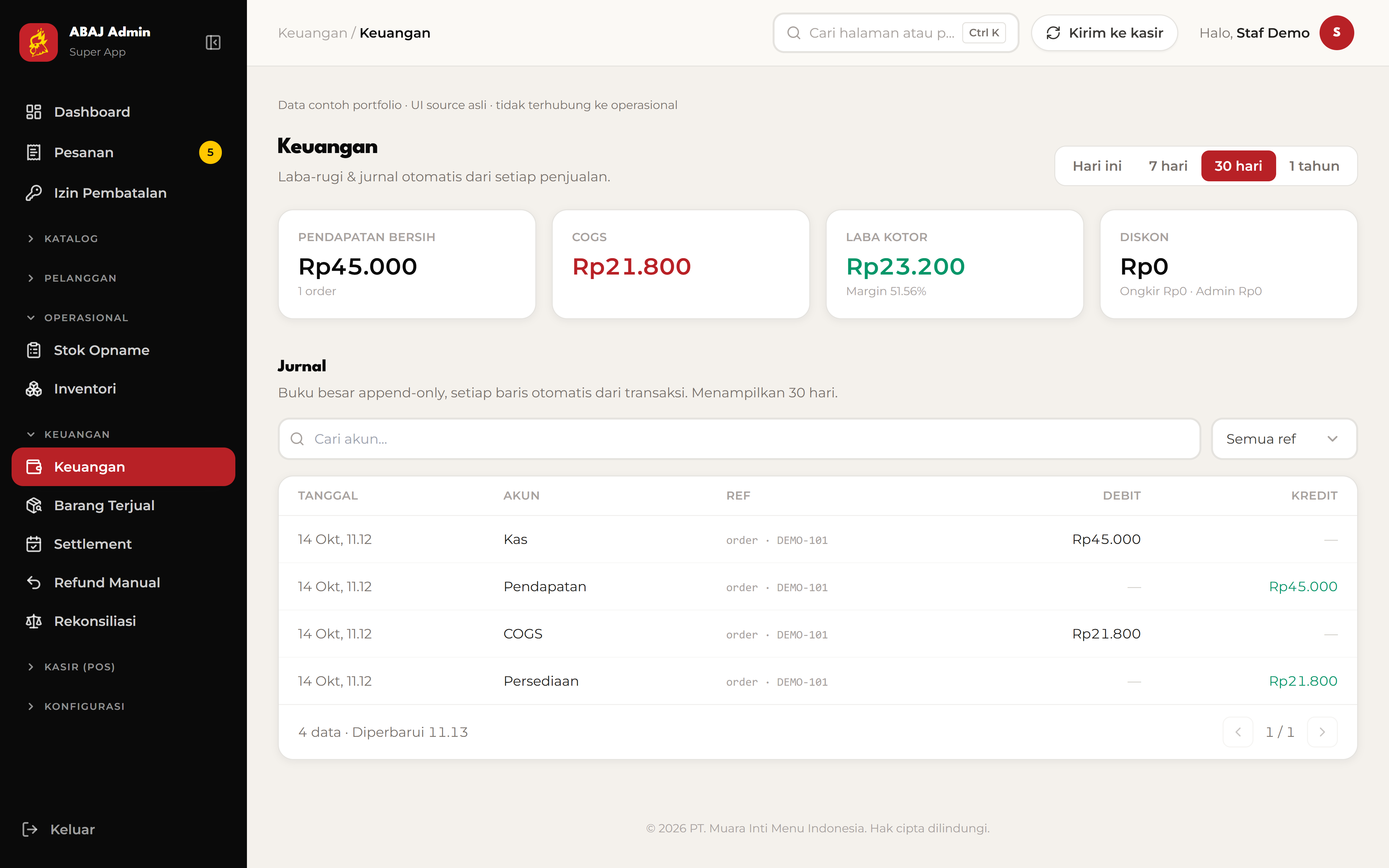
Recipe cost becomes an accounting entry
The ledger source calculates order COGS from recipe quantities and ingredient costs, then posts debit and credit rows for a paid order.
Journal posting checks the order reference before adding rows, so a repeated request does not post the same order again.
The original ERP modules render isolated sample operations. The figures are examples; no private financial records or production writes are used.
Original ERP shell & modules · isolated sample operations ·
Core purpose
Follow the back office: inspect incoming orders, check ingredients and stock movements, then read profit and the journal.
Feature highlights
- Orders across six sales channels
- Ingredients, stock & inventory ledger
- Revenue, COGS & debit/credit journal
The walkthrough
Inspect orders across channels
The order queue brings delivery, pickup, dine-in, takeaway, reservations, and catering together with status and date filters. Operational records are samples.
Check ingredients & stock
The actual inventory module shows ingredient units, unit cost, and available quantity per outlet. Low stock is highlighted so the operator can spot it.
Trace stock movements
Read the stock ledger to distinguish usage from sales and additions from purchases, with ingredient, outlet, and quantity on each row.
Read profit & the journal
The finance module shows net revenue, cost of goods sold, gross profit, and margin above the transaction’s debit/credit journal. These are example figures.
Source and preview scope
Original ERP shell & modules · isolated sample operations. Captured on 13 October 2026. Screen navigation stays within this portfolio.
Fungsi utama
Telusuri back office: periksa pesanan, cek bahan dan mutasi stok, lalu baca laba serta jurnal transaksi.
Fitur pilihan
- Pesanan dari enam kanal penjualan
- Bahan baku, stok & mutasi inventori
- Pendapatan, COGS & jurnal debit/kredit
Alur yang ditampilkan
Periksa pesanan lintas kanal
Antrean menyatukan antar, ambil, dine-in, bungkus, reservasi, dan catering. Filter status dan tanggal membantu memeriksa pesanan; rekaman operasional memakai data contoh.
Cek bahan baku & stok
Modul inventori asli menampilkan satuan, biaya bahan, dan jumlah stok per outlet. Stok menipis diberi warna agar operator cepat menemukannya.
Telusuri mutasi stok
Baca buku mutasi untuk membedakan pemakaian dari penjualan dan penambahan dari pembelian. Tiap baris mencatat bahan, outlet, dan perubahan jumlah.
Baca laba & jurnal
Modul keuangan menampilkan pendapatan bersih, biaya bahan terjual (COGS), laba kotor, dan margin di atas jurnal debit/kredit. Angka memakai contoh lokal.
Source dan batas preview
Shell & modul ERP asli · data operasional contoh terisolasi. Capture diambil pada 13 Oktober 2026. Navigasi layar berlangsung di portfolio.